
Date Formulas in Excel (Now, Today, Day, Month and Year)
In this Excel tutorial show you the different Now() and Today() formula and also how to get Day, Month, Year from date too.
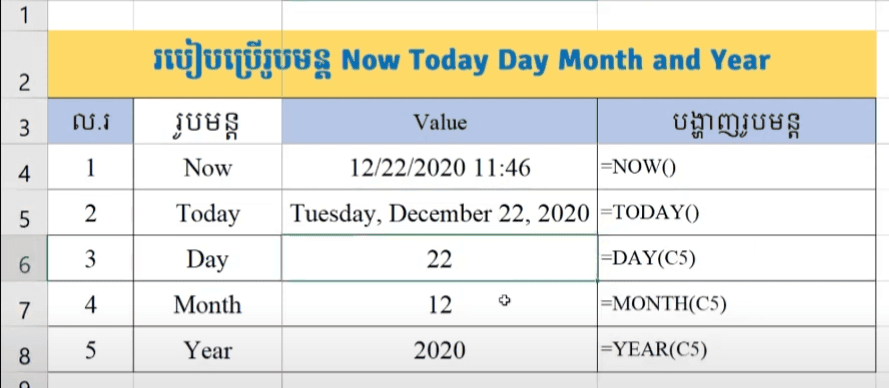
NOW Formula: return current date and time
TODAY Formula: return current date only
DAY Formula: return number of day from date
Month Formula: return Month from date
Year Formula: return year from date
Download Example Excel File below
Download Souce 1
Download Souce 2
Join My Special Courses To Level Up Your Skills: 👉 UP SKILLS 👈
⚡Free Download Khmer Books PDF
⚡Telegram: ReanComputer101
In this Excel tutorial show you the different Now() and Today() formula and also how to get Day, Month, Year from date too.
NOW Formula: return current date and time
=NOW()
TODAY Formula: return current date only
=TODAY()
DAY Formula: return number of day from date
=DAY(serial_number)
◾ serial_number: Required, is your date.
◾ serial_number: Required, is your date.
Month Formula: return Month from date
=Month(serial_number)
◾ serial_number: Required, is your date.
◾ serial_number: Required, is your date.
Year Formula: return year from date
=Year(serial_number)
◾ serial_number: Required, is your date.
◾ serial_number: Required, is your date.
Download Example Excel File below
Download Souce 1
Download Souce 2
Go To Next Video Below
Join My Special Courses To Level Up Your Skills: 👉 UP SKILLS 👈
Useful Links
⚡Learn Code Khmer (HTML, CSS, JavaScript, ReactJS, PHP,...)⚡Free Download Khmer Books PDF
⚡Telegram: ReanComputer101
Tags
Advance Excel
Basic Excel
Day
Excel
Excel Formula
Excel Khmer
Excel Tricks
Excel Tutorial
Month
Year